StockFlow — Inventory + accounting, one system
Your stock and your books, always in sync.
Record a sale once. StockFlow updates your stock, your customer's balance and your accounts in the same moment — so there is never a second system to reconcile.
Built for retailers, traders, distributors and wholesalers
- Stock, purchasing and invoicing in one place
- Live P&L, Balance Sheet & Cash Flow
- Real double-entry accounting underneath
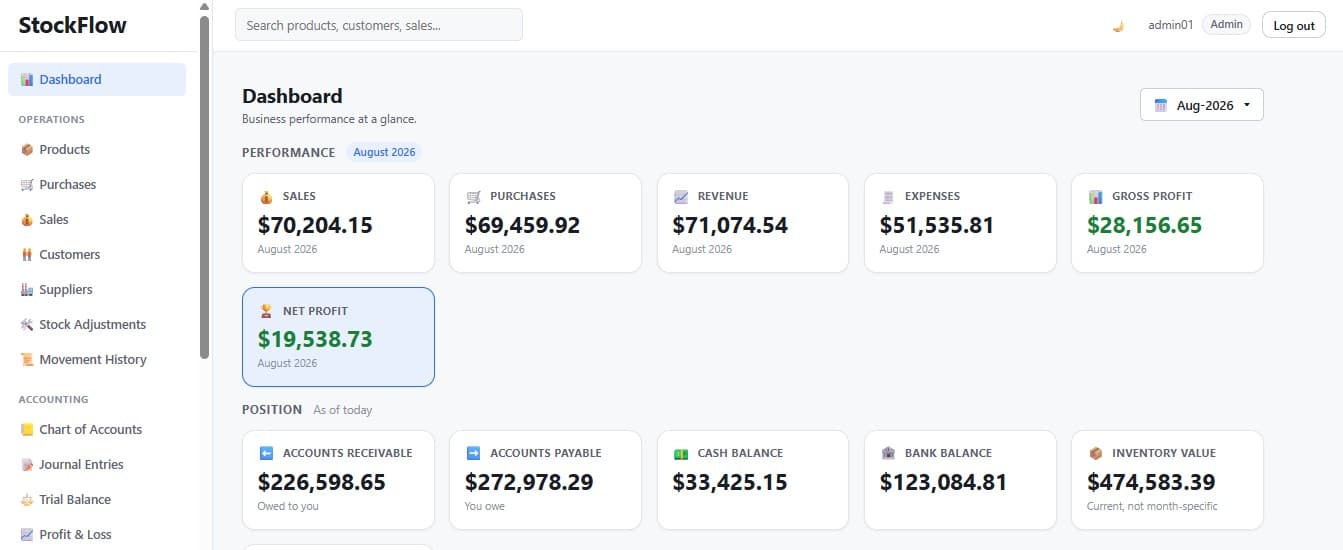
Screens throughout this page are unmodified StockFlow captures. All figures shown are sample data.
The solution
One system, where every transaction keeps both sides correct.
StockFlow does not sync two systems. It records the operational fact and the accounting entry as a single, balanced transaction — so there is no moment where inventory and the ledger can disagree.
What StockFlow posts automatically
Debits = Credits| Business event | Debit | Credit |
|---|---|---|
| Purchase (cash or bank) | Inventory | Cash / Bank |
| Purchase (credit) | Inventory | Accounts Payable |
| Sale — revenue | Cash / Bank / Receivable | Revenue |
| Sale — cost | Cost of Goods Sold | Inventory |
| Customer payment | Cash / Bank | Accounts Receivable |
| Supplier payment | Accounts Payable | Cash / Bank |
| Expense | Expense account | Cash / Bank |
| Stock adjustment | Inventory * | Inventory Adjustment * |
* Direction reverses for a negative adjustment. Every posting is validated as debits = credits before it reaches the database; manual vouchers remain available for accruals and corrections.
None of the above requires a bookkeeping step.
One transaction, three records
Follow a single invoice through the whole system.
Invoice INV-000429 appears in three different screens of the same demo dataset — the sale, the stock it consumed, and the ledger entry it posted. Nobody typed it three times.
The sale is recorded
INV-000429 is created against a customer with a payment method. That is the only thing a user does.
Sales · INV-000429 · Bank · Paid
StockFlow / Sales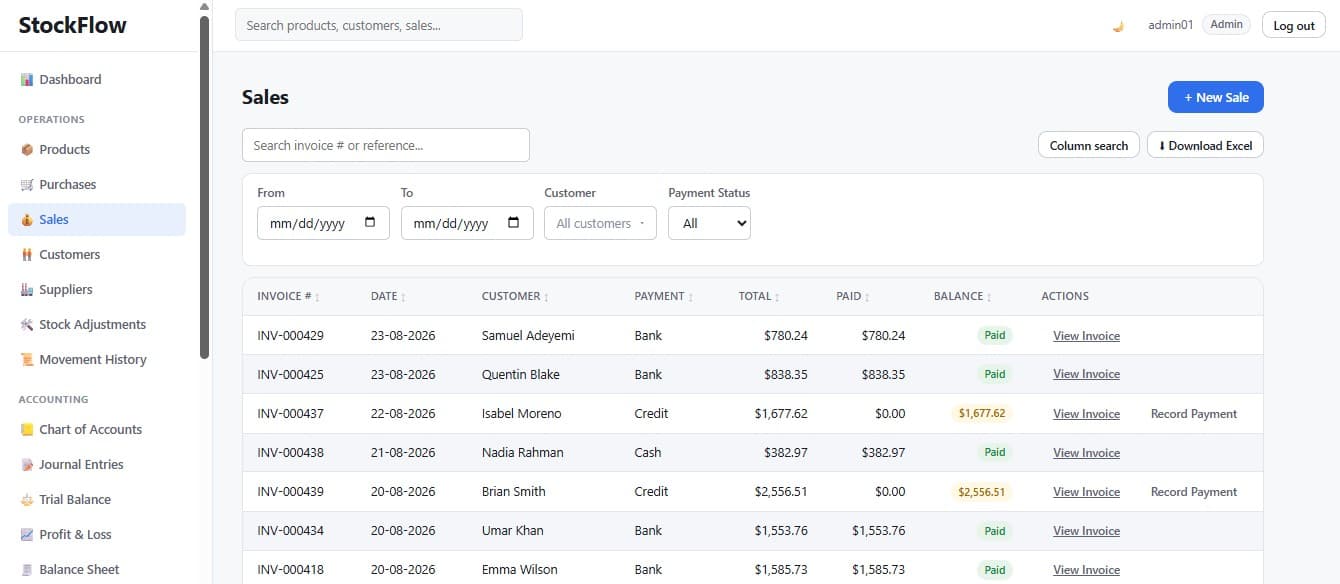
Stock moves, and says why
The invoice issues stock at the current weighted-average cost. Each line is written to the movement history with the invoice as its reference — traceable forever.
Movement History · Sale · −15 and −1 units · Ref INV-000429
StockFlow / Movement History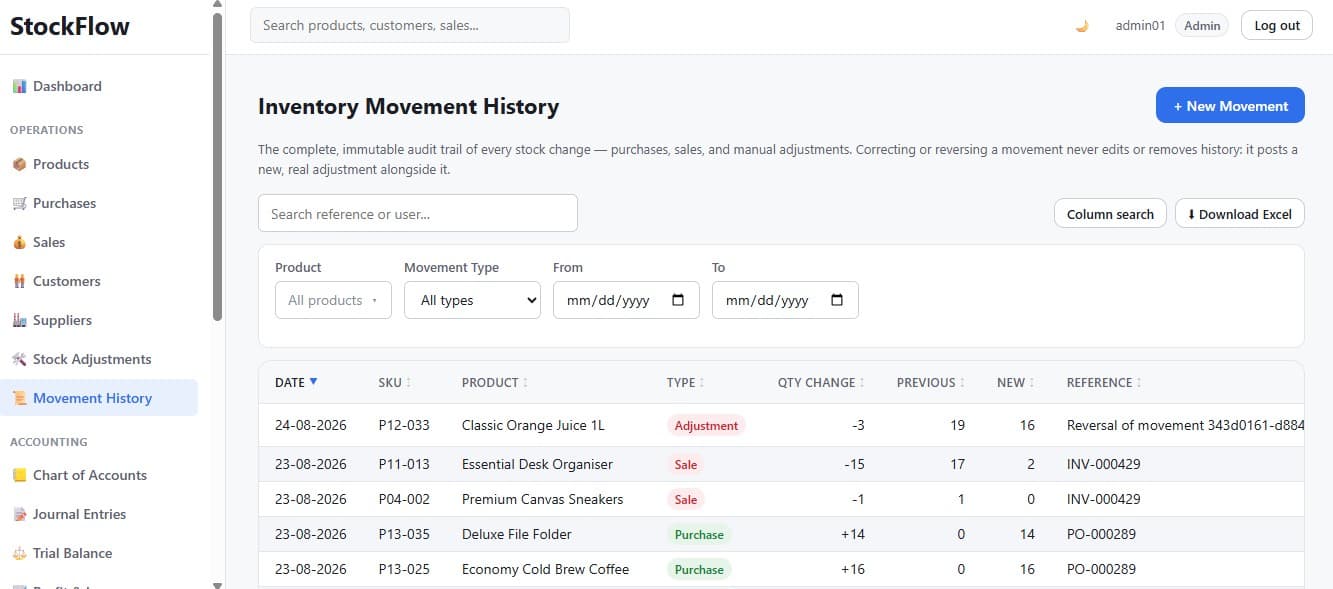
The ledger is already posted
Journal entry JE-001608 is posted in the same database transaction, carrying the revenue and the cost of goods sold. No bookkeeping step, no month-end catch-up.
Journal Entries · JE-001608 · Source: Sale · Posted
StockFlow / Journal Entries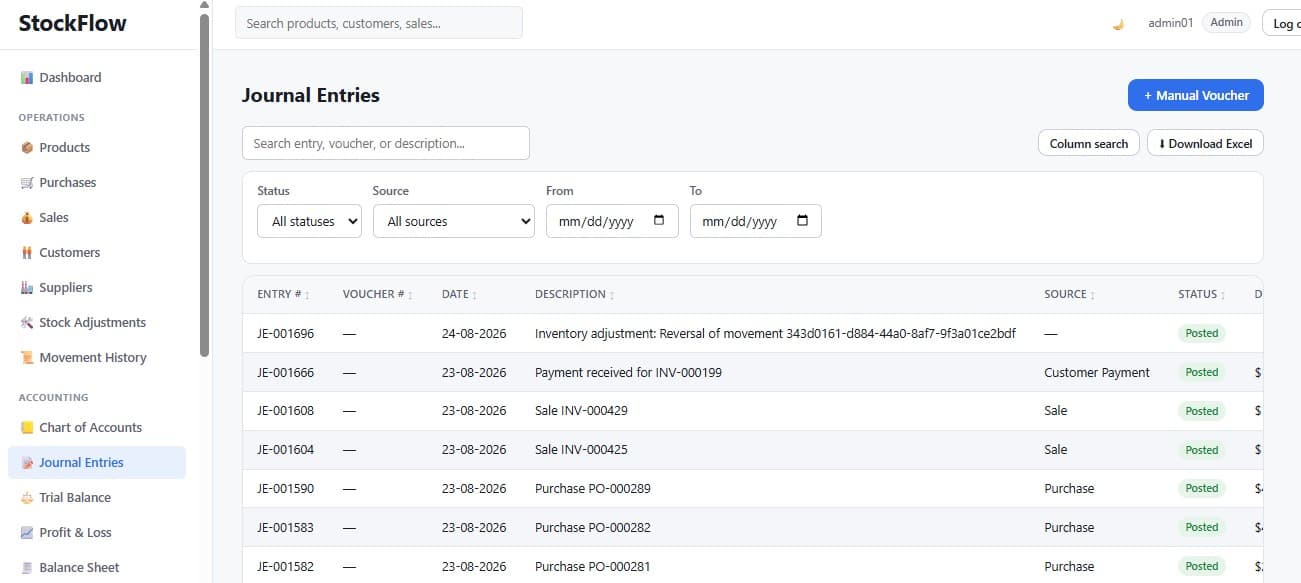
That is the whole idea: one transaction, and everything it touches is already correct.
See it on a live walkthroughInventory
Know what you hold, what it cost, and where it went.
Quantity on hand and weighted-average cost are computed from real transaction history — never typed in, never estimated.
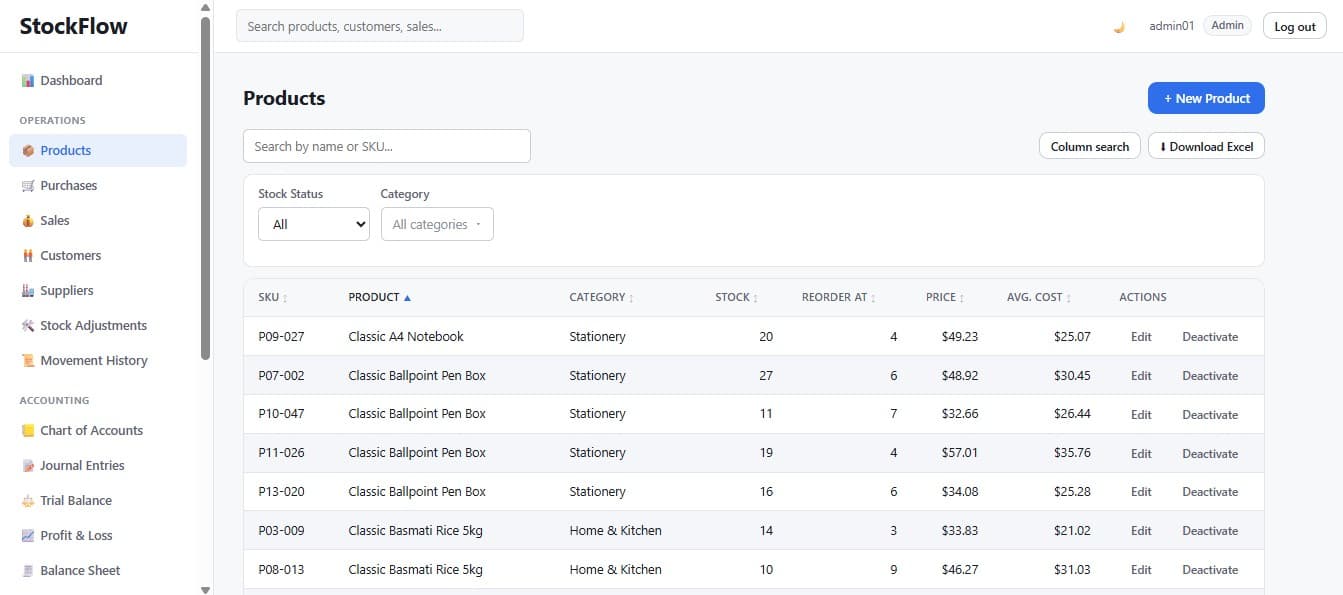
Live stock and value per product
Every product carries its SKU, category, price, reorder threshold, quantity on hand and average cost. Inventory value is quantity × weighted-average cost, summed across the catalogue.
Adjustments that keep the books honest
Damaged or found stock is corrected with a reason, and the matching accounting entry is posted at the current average cost. The physical count and the ledger stay together.
Purchasing & sales
The buy-and-sell cycle, with the money side already handled.
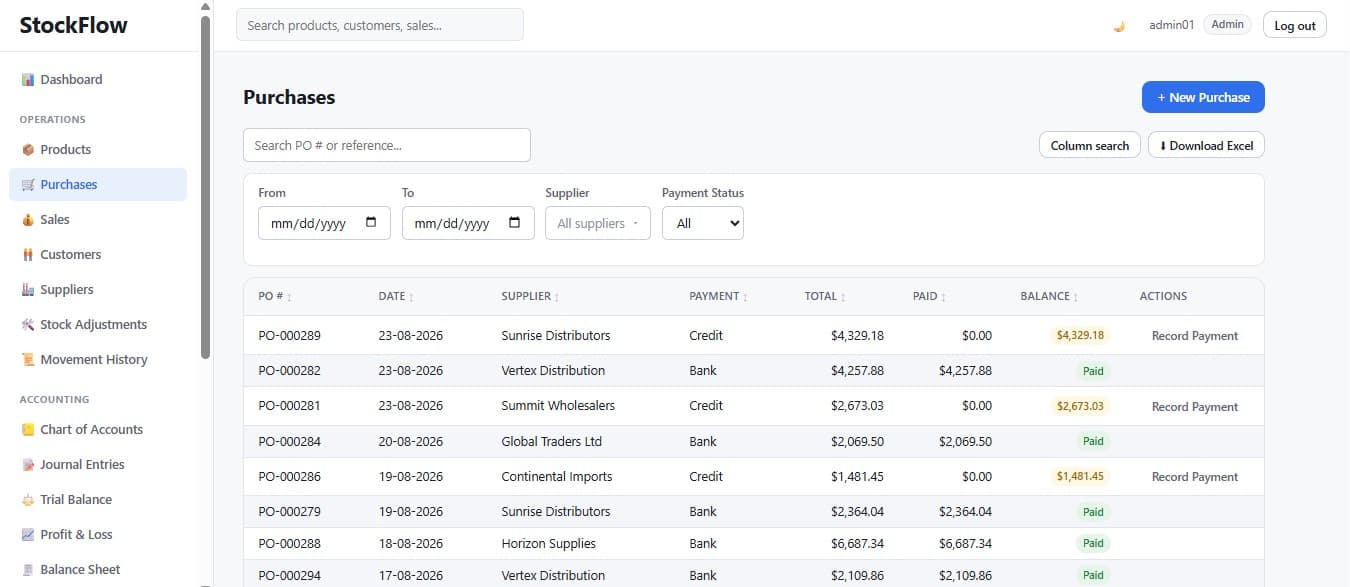
Multi-line purchase orders and sales invoices, paid by cash, bank or credit — each one moving stock, cash and the ledger together.
Purchases receive stock and recalculate cost
A purchase order receives goods at their unit cost, recalculates the weighted-average cost, and posts against cash, bank, or accounts payable depending on how it was paid.
Credit is tracked, not assumed
Credit sales raise receivables, credit purchases raise payables, and recording a payment reduces the balance and the matching wallet at the same time.
Accounting
A real general ledger, not a balance column.
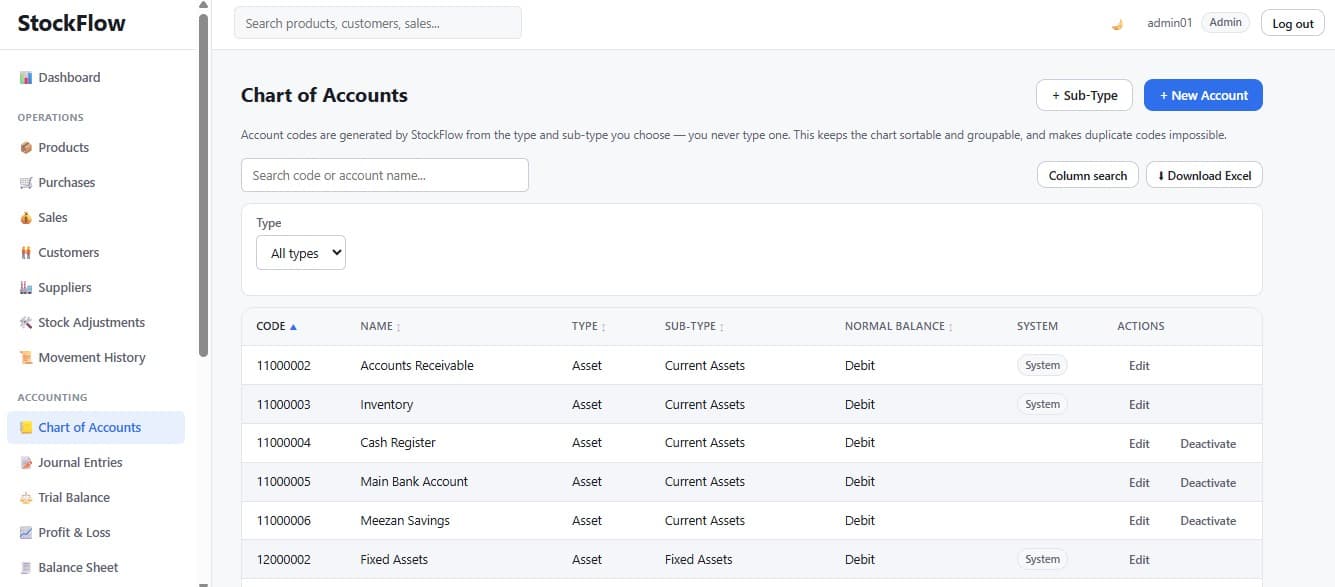
StockFlow keeps a genuine double-entry ledger underneath the operations — the same ledger every financial report is computed from.
Balanced by construction
Every posting is validated as total debits equal total credits before it commits, so an unbalanced entry cannot reach the database. Your statements are consistent when you hand them to an accountant, a bank or an investor.
Corrections leave evidence
Journal entries move from draft to posted to reversed. A reversal creates a new offsetting entry — originals are never edited away, so an accountant can always see what changed and why.
Financial reports
Statements that are ready before you ask for them.
Every report is computed live from the same general ledger the operations post to — no month-end wait, no export into a second tool.
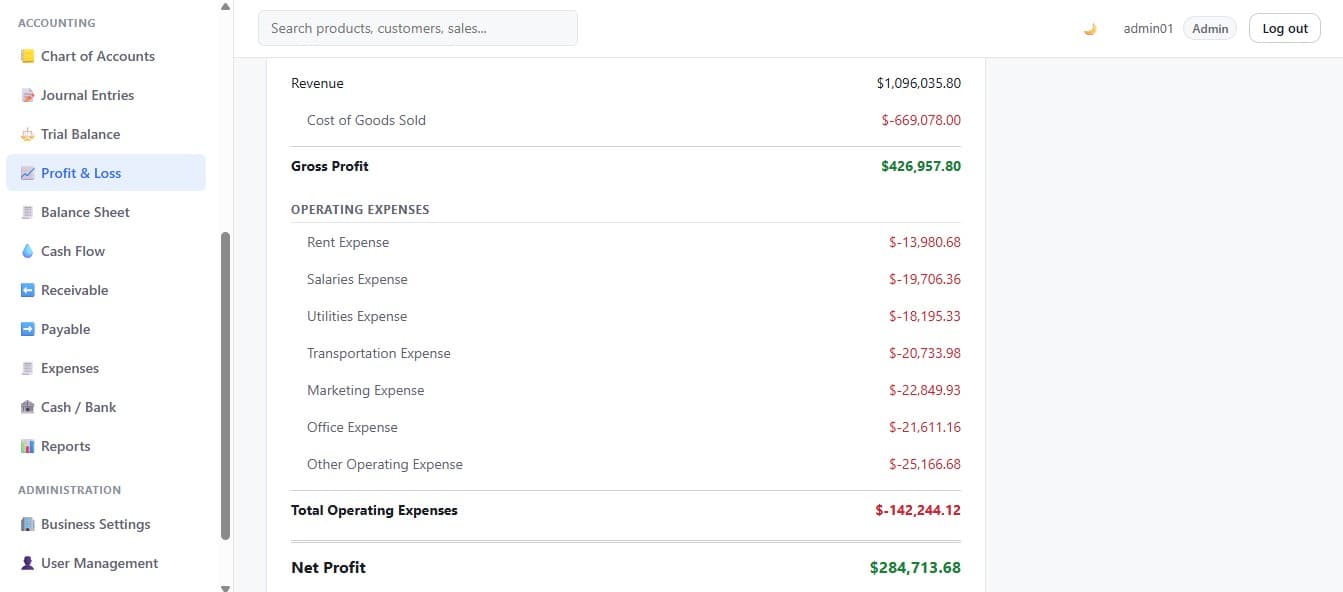
Did the business make money this period?
Revenue, cost of goods sold, gross profit, itemised operating expenses and net profit for any date range — with a bar chart above the statement.
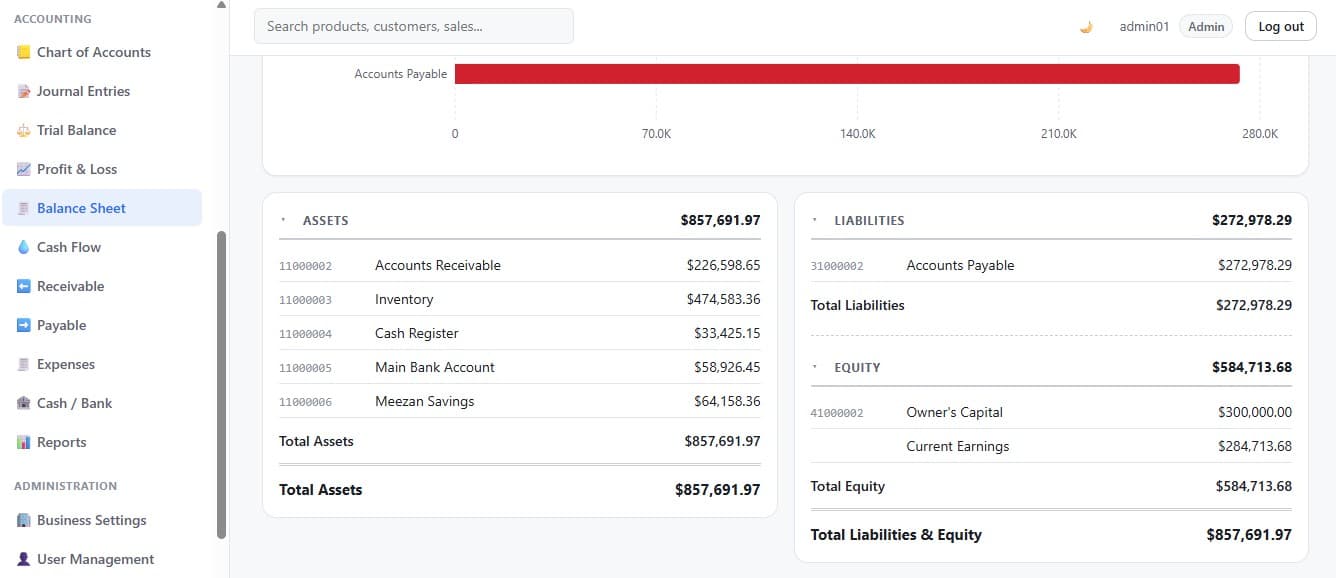
What do I own, and what do I owe?
Assets, liabilities and equity as of a closing date, carrying a balanced flag. In the capture below, assets of $857,691.97 equal liabilities plus equity exactly — because the engine will not allow anything else.
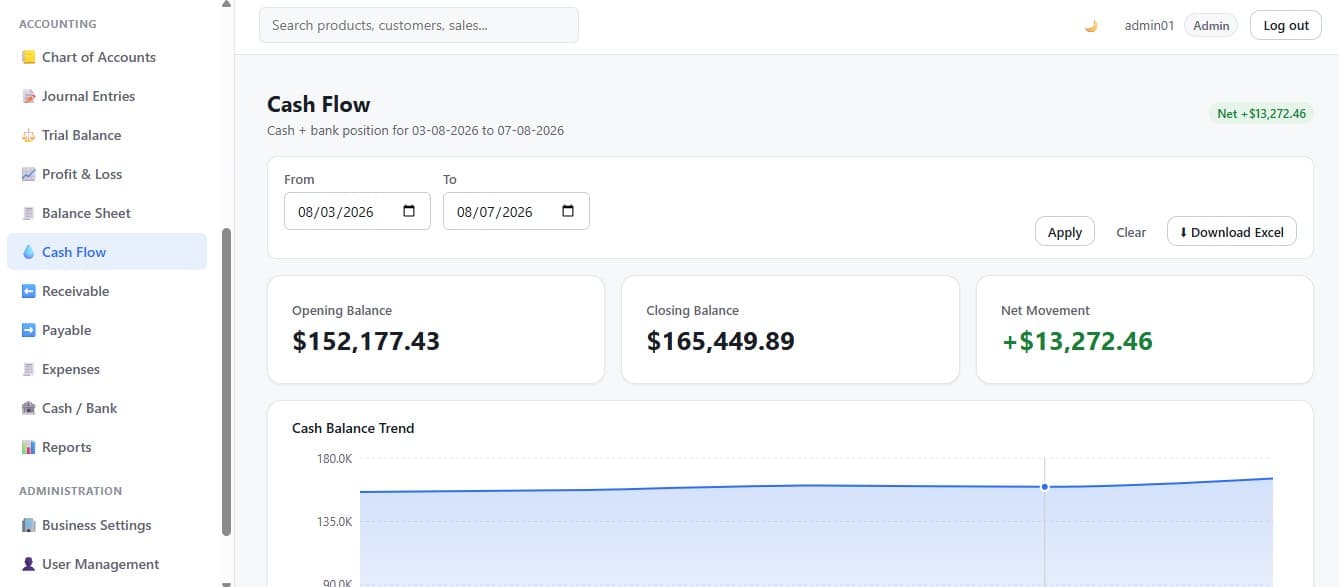
How did my cash position move?
Opening balance, closing balance, net movement and a daily trend, built from the real cash and bank ledger accounts. This is a cash position view, not a formal IAS 7 statement.
Also included, all exportable to Excel
- Trial Balance
- Accounts Receivable aging
- Accounts Payable aging
- Inventory Valuation
- Sales Summary
- Sales by Product
- Sales by Customer
- Purchases by Supplier
- Low Stock
A per-account General Ledger is also available, with opening balance, every posted line and a running balance over any date range.
Dashboard
The whole business on one screen — for any month you choose.
Performance figures answer how the month went. Position figures answer where the business stands. A month picker moves both back through history.
Performance
For the selected month
- Sales
- Purchases
- Revenue
- Expenses
- Gross Profit
- Net Profit
Position
As of month end, or today for the current month
- Accounts Receivable
- Accounts Payable
- Cash Balance
- Bank Balance
Always current
Inventory figures show live state and are labelled as such
- Inventory Value
- Low / Out of Stock
- Low stock table
What changes
What changes when you run on StockFlow.
Four things that are different from the day you switch.
Reconciliation stops being a task
Inventory and accounting are written together, so there is no monthly exercise to make two systems agree.
Financial position is always available
Profit and loss, balance sheet and cash position are a screen away for any period, without preparing anything first.
Stock questions have answers
What you hold, what it is worth, what is running low, and where every unit went — traceable to the document that moved it.
Overdue money becomes visible
Receivable and payable aging buckets show what is current, what is 31–60, 61–90 and over 90 days late, before anything is written off.
Questions
What people ask about StockFlow.
Straight answers about what the system does — and where it stops.
What is the difference between inventory software and accounting software?
Inventory software tracks what you physically hold — quantities, costs, reorder levels and stock movements. Accounting software maintains a general ledger and produces financial statements such as a profit and loss, a balance sheet and a trial balance. Most businesses run both and reconcile between them. Integrated systems like StockFlow keep one record: the stock movement and its journal entry are written together, so the two can never disagree.
How can a small business track inventory and accounting in one system?
By recording the operational transaction and its accounting entry as a single action rather than two. In StockFlow, creating a sales invoice reduces stock at weighted average cost, posts revenue, posts the cost of goods sold, and raises a receivable if it was sold on credit — all in the same database transaction. There is no export, no import, and no monthly reconciliation step.
How is cost of goods sold calculated?
Cost of goods sold is the cost of the stock you actually sold, as opposed to what you charged for it. StockFlow calculates it using the weighted average cost of the units on hand at the moment of the sale, snapshots that figure onto the sale, and posts it to the ledger. Gross profit is then revenue minus that cost, and it stays accurate even when your purchase prices move.
What is StockFlow?
StockFlow is a web-based inventory management and small-business accounting system. It handles products, stock, purchasing, sales, customers, suppliers and a full double-entry general ledger in one application, so operational transactions and accounting records are always produced together.
What financial reports does StockFlow provide?
Trial Balance, Profit & Loss, Balance Sheet, Cash Flow (cash position), Accounts Receivable aging, Accounts Payable aging and Inventory Valuation, plus a per-account General Ledger. There are also operational reports for sales summary, sales by product, sales by customer, purchases by supplier and low stock. The financial and operational reports export to Excel.
What does StockFlow deliberately not do?
StockFlow does not cover manufacturing or bill-of-materials workflows, multi-currency accounting with exchange rate conversion, payroll, tax filing integration, point-of-sale hardware, e-commerce platform synchronisation, or native mobile apps. It also holds no compliance certifications — the security described on this page is what the system implements, not an audited standard.
See the whole cycle, end to end.
A live walkthrough of the parts that matter to your business — purchasing, stock, invoicing, or the accounting underneath all of it. No generic pitch.